Showing posts with label Mobile. Show all posts

Wednesday, February 19, 2014

Best Women Safety Android and Iphone Apps

Imagine a situation. You have to travel alone to your native place in a private bus, and then you face a horrible situation where you cant help yourself. Or imagine another situation, where you go out alone for shopping, you take a taxi home and before you notice, the taxi directs to a wrong direction. It always takes just a few seconds for something wrong to happen. Many of us, especially women are not being allowed to go out alone because of the threat. However we don't have a complete solution to this problem, but of course a precautionary step can be taken, in order to prevent such situations. The Delhi case and the recent case in Hyderabad where women have beenbrutally treated, in these kind of situations this can be a clever step which may protect you. 

staysafe3
There is a way where you can notify your friends or family in case of any emergency. StaySafe is an Android and IOS app that allows you to automatically inform your emergency contact list and send them your latest GPS location.

staysafe2
This app is available for all the android devices in Google Play App Store and IOS devices in Itunes App Store. All you need to follow is a few steps of registration and you can use the app.


The major key points of this app are:

1. A simple shake activates the SOS alerts
2. A text message and/or email is sent to your selected contact(s) with your name and a voice recording of the situation just after you shake your phone.
3. Your exact location is sent in the alert.
4. The battery level of your phone is sent in the alert.
5. These messages are sent at regular intervals which can be set, to help identify if the user is moving.

 Download and Install SOS on your Mobile

  • Open the stay safe app in your phone as soon as you download it.
  • Here you have to select a security pin which is of a 4 digit number, this security pin is for conformation of your phone number.

sos
  • In this step you have to set the shake limit by setting a timer. 

sos2
  • As we can see in the picture below, in the time set above, for example 3s, we should be setting a shake limit.
sos3
By following the simple steps, your registration is completed. SOS Stay Safe is a very useful and easy way to avoid any kind of emergency problems when you are alone. 
sos4
Users can send SOS alerts to their friends and family on sensing danger, simply by shaking their phone. Text and email messages are sent at regular intervals to provide real time GPS tracking from your exact location. The alerts are sent discreetly, without you having to even look at your device.
This app comes into handy in different situations for anyone, like say accidents, abuses on women, kidnaps etc. 
sos+stay+safe

Start using this app, its extremely useful in tough situation you never imagine. Though this might not be exactly helpful, in case of low battery or network problems, this is just a solution as something is better than nothing.

How to Fix No service and Searching Error in iPhone

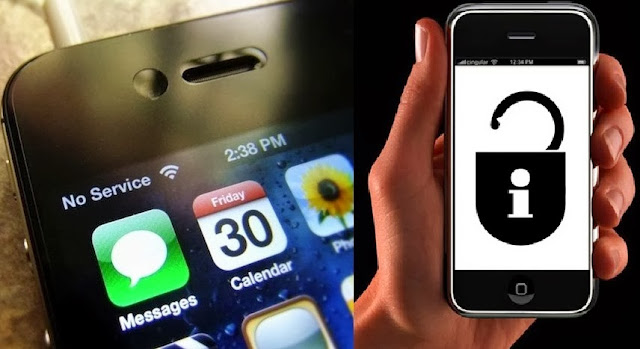
Often times, the most problematic issue Iphone users face is the "No service and Searching.." status, in the network area of their phones. This happens especially in the case of IOS 6, which was discovered to be the most common issue in the recent times. As soon as you upgrade your IOS to 6.1 or 6.1.3, you cannot unlock your phone. Even if there is no simcard, it shows No service status.
noservice
In this article, I would like to show you how to fix the "No service and Searching..." issue in the versions of 6.especially in Iphone 3GS, 4G and 4S.

Follow the steps very very carefully, and get best results.

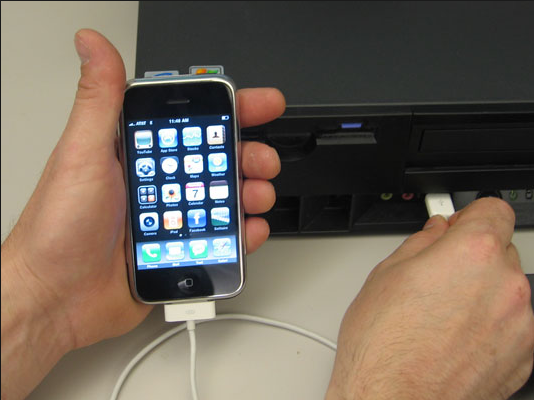
1.Connect your Iphone to the system after you see the No service or Searching... status as soon as you upgrade your IOS version.
iphone+connected+to+pc
2. The only solution to unlock your Iphone is to jailbreak it. In order to do that, you have to 
  •  Download a jailbreaking software called as Red Snow version 0.9.15b2 available Here
  •  Download the required IPSW which is the software which will be updated in your device. Since we are using the IOS 6 version, download IPSW 6.0 Here. It will ask you to specify your device and the version for the download to start.
redsnow     ipsw6.0
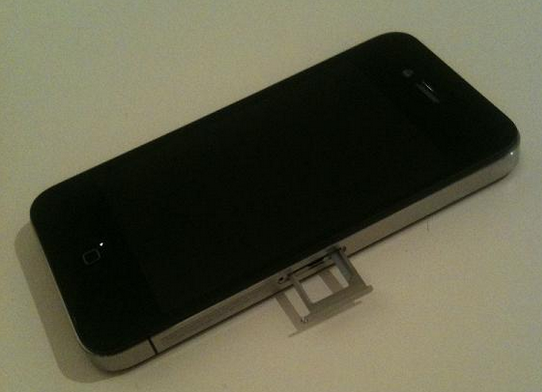
3. Make sure you remove your simcard from the device. This is for keeping your device protected from hacking. 
removing+iphone+simcard
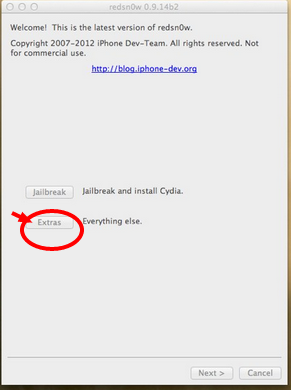
4.After downloading the above two softwares, open RedSn0w and click Extras on it as shown in the picture.
step1+redsnow
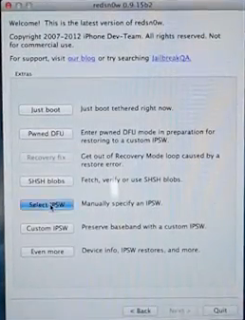
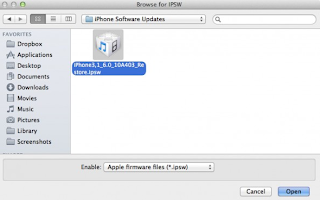
5. Click next and select the option "Select IPSW". This will allow you to select the downloaded step2+redsnow   ipsw+6.0
IPSW 6.0
6. It will say that your software is successfully installed. Now click on next. A warning is displayed then, which you have to check very very carefully.  
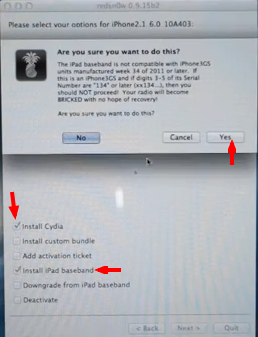
is+this+a+newer+model+of+the+iphone+3gs
Now read the rules carefully and check the manufacturing date of your device, by checking the serial number on your simcard tray. Remove the simcard tray from the device and check the serial number. 
serial+number+on+simcard+iphone
Carefully click on yes or no depending on your serial number.
7. Next it will direct you to the selection screen, where the options are provided which you would like to install on your device. Select "Install Cydia" and "Install Ipad Baseband" and click yes if your device is an unlocked one. You can see this in the picture.
step4+redsnow
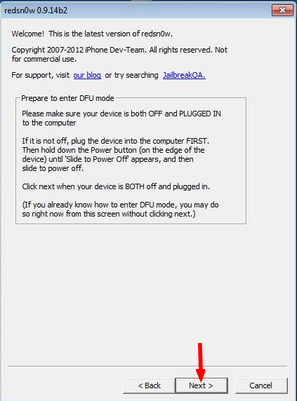
8. Now a little complicated stuff appears. If you are jailbreaking your device for the first time, you have to be very careful doing this. The RedSn0w now asks you to put your device in DFU mode. Switch off your phone and click Next. 
dfumode+step+5.1
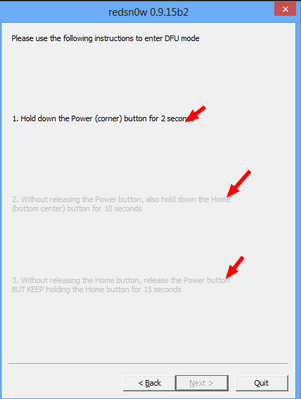
9. Three steps to put your device in DFU mode:
  •  Hold the Home + Power buttons on your device simultaneously for 10 seconds.
  •  Release the Power button without releasing the home button. Continue holding Home for another 10 seconds.
  •  Release Home, and your screen should stay completely black. If so, chances are you successfully entered into DFU mode.
                                              dfumode+step+5.2
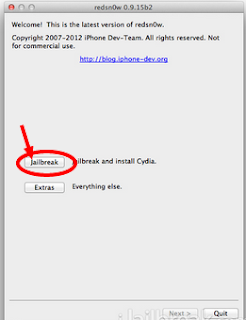
10. . Now click on Back and come to the main screen. Your device is all set to jailbreak now. Click on the JailBreak option.
step3+redsnow
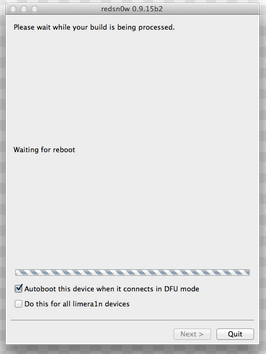
  • This will take upto 2-3 seconds and your phone starts rebooting as shown in the picture. 
                                               reboot+screen+5.3
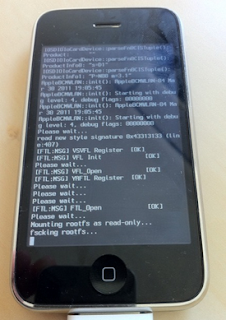
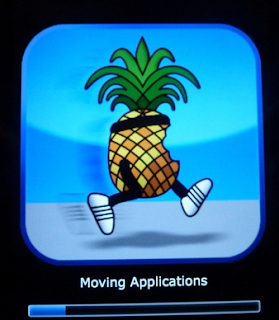
11. Keep your phone aside, Sit back and relax. You have crossed the tough hurdles. Do not worry, this process of jail breaking may take upto 10-15 minutes. You can see the following codes running on your device and a Pineapple icon on your device, which is a positive sign of things working. 
codes+running+6.1redsn0w+rebooting+iphone++step+6
Wait till your device restarts. 
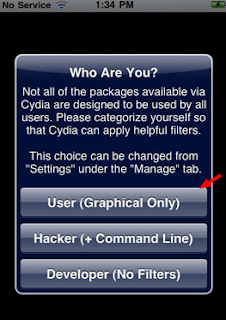
12. As soon as your device restarts, it will be unlocked. Open Cydia, which you already installed on your device. Let it download the packages. And do not forget to save the SHSH blobs available. Select the User option in Cydia.
cydia+options+after+jailbreak++1
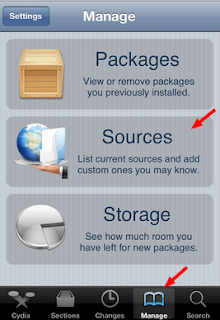
13. Click on Manage and then click on Sources option. 
cydia+options+manage++2
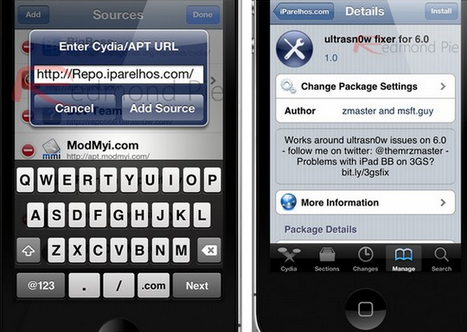
14. Click on edit and add the Source package as shown in the  first picture. 
untrasn0w+fixer
And then go to search and search for Ultrasn0w fixer 6.0. Install it. 
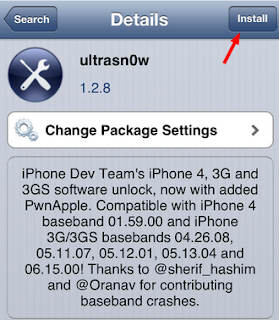
. Go to search again and search for ultrasn0w. Install it too.
downloading+ultrasn0w+in+cydia
15. Restart your device and put on your simcard. Your device should detect the network by now if everything goes well. You can also put your phone in airplane mode and get it back to normal to make it work. 
Also check the status of the version and baseband, go to Settings->About.

How to Control your Android Mobile from PC or Laptop

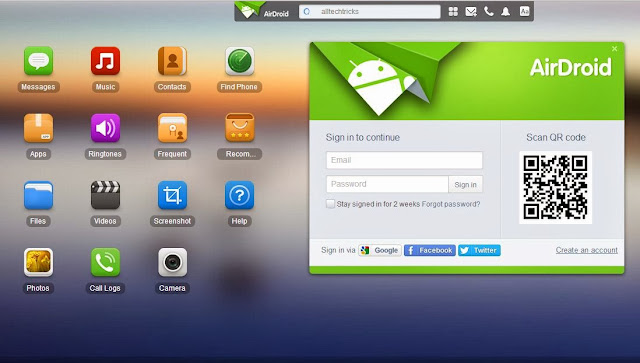
Here in this article we will explain how to control your mobile from PC ! Yes its possible get access to your device.This will help you to manage your mobile when it is not available with you and best thing is you can share and Transfer files from PC to mobile wireless.
control+android+mobile+from+pc
To Control  Mobile from PC there are many apps availablebut not all apps are best here we listed best app to make your work easier.

1.Airdroid for Android:

This is best Android app to transfer files from PC to Mobile for free.If you are ever tried sharing apps and file using Bluetooth and USB cable.
airdroid

Advantages and Features:
  • Send and Receive SMS from PC.You can also directly talk from PC.
  • Transfer files,apps,photos,videos from PC to mobile wireless
  • Install/Uninstall apps easily and flexibility to take complete back up of your device.
  • Trace your device when you lost it and much more..!!

Step by Step Process to use Airdroid:

  • Download Airdroid on your device.
  • Now Install and Open app then Click on Start icon.
install+airdroid
  • Now note down the web address after clicking start icon.
copy+webaddress
  • Now from PC browser go to web.airdroid.com or in Enter the Web address you copied in previous step.
Note: Make Sure that your device and PC is connected to same Network

open+in+pc
  • If you are going for web.android.com then you need to verify your device by scanning QR code or by entering password.
enter+password
  • Now you have successfully connected your android device to PC.You can start upload files by clicking files logo on desktop,you can chat from your PC and can have full access to your android phone or Tablet.
whatsapp+conversation+from+pcupload+and+delete+files
  • That's it Guys ! there are many features avalible once go through all of them and enjoy.

Here is Quick Video 

How to Unlock Android Phone Pattern or Password Lock Easily

Android lock screen is a very strong protection of data on any android device. There may be times if you forget your pattern and want to reset it, this article shows how you can unlock your android pattern lock screen with very simple steps. This is an educational article. Try this at your own risk. This website is not responsible for any issue which may occur.
remove+android+pattern+lock+easily

Steps to Unlock Android pattern lock:

1.Enabling USB Debugging:

For this process to be a success, the device which you wish to unlock should be enabled with USB Debugging. For this go to Settings->Development->USB debugging and enable it.
usb+debugging

2. Connect the device to the computer:

android+phone+connect+to+pc
Now after making sure that the device is USB Debugging enabled, Connect it to the computer.
  • Go to start and open CMD.
  • Type the following code very carefully.
adb shell
  • Now press enter
rm /data/system/gesture.key
cmd+commands

3. Reboot:

rebooting+android+phone

After giving the commands in the CMD, restart or reboot the android device. Now give any pattern and your device should be unlocked.

Sunday, February 16, 2014

How to Hide Last Seen on Whatsapp in Android,Iphone

Whatsapp one of most downloaded Android app.I am sure if you are a smart phone user then you might also beusingWhatsapp.One survey tells that more then 1 billion whatsapp messages are sent daily.
hide+last+seen+in+whatsapp
Whatsapp offers a excellent feature last seen option.It will let you know whether the person on other side checked your message or not.Actually this is a best feature but now a days it has becoming trouble for many people.Yes if you want to skip chatting with your friends then this is a big problem because as when you saw the message the person on other side get notified by last seen time and date.If you are the one who want to skip conversations and avoid misunderstandings with friends then this article is for you.! Now hide last seen on whatsapp and read messages without knowing to others.

Hide last Seen in Whatsapp in Android

  • Just download the app form Here
  • Now open app and click on "Block last Seen".
  • That's it now you can hide last seen in Whatsapp.

How it works?

  • This apps will disconnect internet connection when you open whatsapp.so servers can't update last seen seen when you open message.
  • Now When you close whatsapp the internet connection is active and will send the messages without updating last seen status.

Using Manual Method to Hide last seen in Android:

It's simple just disable mobile data,open whatsapp read messages and close it.Now activate mobile internet connection.

Hide Last Seen Stamp in Whatsapp in Iphone:

hide+last+seen+iphone

In Iphone hiding last seen is pretty easy then Android.Latest version of whatsapp for iphone has "Last Seen Timestamp" option.This will help you to hide last seen status in whatsapp.To activate it just go Settings --> Advanced-->Last Seen Timesatmp and now make it Off.

Use your Whatsapp without using your phone number


  • Yes, you heard it right, you can use your Whatsapp without using your phone number. Confused? Then have a look at the below statements. 
  • Complete the downloading part of Whatsapp on your phone and when you are done with it you will notice that it sends the verification message to its server. 
  • Now the work/trick that you need to do/perform is blocking the message service and this can be easily done by keeping your phone on flight mode. 
  • Now when you do this one more thing can happen and that is Whatsapp chooses an alternative way for the verification, so choose the verify through message option and fill up your email address and then click on the send option and as soon as that cancel the sending message option. 
  • Now you need to do is message spoofing. 
  • And after the spoofing of the message is done, you will receive messages intended for the spoofed number of your device, and then you can use your Whatsapp to communicate with people with your spoofed number. 

Hacking the conversation of your friend In Whatsapp

Are you still living in the old era by using the default messenger provided by your mobile phone, then now it's time that you get modernized and use Whatsapp, the instant messaging app that has taken the messaging field with a storm with its outstanding features, tips and cool tricks, and as the time is passing its getting more advanced with its cool features like that of sending photos, sending videos, easy connectivity and much more. Did you know that whatsapp can not only be used for chatting and calling, but you can also perform some cool tricks with this app. So to know about some cool stuffs related to Whatsapp just go ahead of the post and try it out by your own.
Whatsapp+tricks+and+tips

Hacking the conversation of your friend

Have you ever thought that you can hack the Whatsapp conversation of your friends? It sounds really cool and a hot stuff right? Then let me tell you this amazing trick by which you will be able to hack your friends Whatsapp conversation. 
  • The first and the foremost thing that you need to do is, go to the MicroSD card and then click on the Whatsapp and later on on the Database option. 
  • After you are done with the first step you will find two files namely,
-msgstore-yyyy..dd..db.crypt
-msgstore.db.crypt
  • After finding these two files, you just need to do is take these files from your friends mobile and then you will be easily able to read their conversations that they have done with their friends. 

How to Lock Whatsapp with Password in Android Iphone and Blackberry

As the WhatsApp is not having inbuilt security feature we are using the Phone’s inbuilt pin and other pattern locking apps to protect messages from the unknown people, But we can’t block our friends and family members from accessing the whats app messages  with the phone’s inbuilt authentications as they knew our phone’s pin and otherpattern locks!. 
lock+whatsapp
Therefore we need a system like double authentication which ask for another pin or password  to access the messages in our whats app messenger!

We have tested so many apps which can block the unauthorized access to the WhatsApp Messages, finally we came up with a best app which is easy to use and simple in user interference.

Whatsapp Lock for Android:

whatsapp
  • This is a simple App which  can solve our problem and give complete privacy for the messages on Whatsapp 
  • The best feature of this app is it can take the photo of those who tried to access your Whatsapp messages with invalid pin! 
  • Simple and easy user Interference. 
  •  It is available for absolutely free on Google PlayStore. You can this app From Here. 
  •  Supports Android 2.2 and above
Download Whatsapp Lock Here

How To Lock Whatsapp on Iphone:

Till now there is not any genuine app that can lock only Whatsapp in iphone and ipad.In store there are many fake apps available which tells that this app can protect Whatsapp with password.That all are waste and doesn't work.I recommend you to not to buy that apps and if you want to protect your Whatsapp then you must go for home screen lock for now.If we found any genuine app we will update here.

Lock Whatsapp in Blackberry:

Yes here is simple app to lock Whatsapp messenger on your blackberry.Lock for Whatsapp allows you to keep your own password  for Whatsapp.

Best Sites to Get Awesome Whatsapp Status and Messages - Top 3 Sites

As we all know, whatsapp messenger is the most popular and the most used messaging app among the android phone users. One of the most attractive features of Whatsapp messenger are the status texts. We often change the status texts in whatsapp, who doesn't what to attract their friends with awesome, funny and also attractive status texts?
whatsapp+++1
In this article, we show some of the best websites which give you awesome quotes and status messages which we can put up as status texts in whatsapp. 
whatsapp

1.StatusWhatsApp:

This is the most useful and favorite website which is also available via an app which can be downloaded from the google play store. 

The website version of Status Whatsapp provides many status quotes which you can directly copy and paste to your status texts in whatsapp. The app version is even more easy and useful.

Whatsapp+++Status+and+quotes
Status whatsapp is being used by many whatsapp users across the world. Go to your google app store and install this awesome app for cool status updates.

2.BrainyQuote:

This Website is a collection of inspirational and famous quotes by authors you know and love. Not only can these be used in whatsapp but also other social networking sites and apps like facebook and twitter too. This website provides numerous collection of quotes and texts written by many authors across the world. 
  • I recommend this website as i love the quotes and messages they provide. give it a try.

brainy+quotes

 3.SearchQuotes:

Another website which is similar to Brainy quotes. This also has a huge collection of status updates. The best part of this websites is its collection of catagories like life quotes, love quotes etc. Check out this awesome website for amazing status messages. 
Search+Quotes